Living abroad comes with responsibilities, and caring for your parents’ health back home in Nigeria is one of them. As their medical needs grow, finding senior-friendly health insurance in Nigeria can be complicated, and that’s exactly why SendCare exists.
If you’ve been wondering how SendCare works, this guide will walk you through every step of getting reliable health insurance for your elderly parents in Nigeria while you’re abroad.
What is SendCare?
SendCare is a health insurance plan by MyCoverGenius that allows you to secure quality healthcare for your parents and loved ones in Nigeria, no matter where you live in the world. You pay in your local currency, while they receive instant access to care and coverage across over 1,200 hospitals nationwide.
Built specifically for seniors aged 55 to 80+, SendCare focuses on an age group where healthcare needs are more frequent and more urgent. Most traditional insurance plans either exclude older adults or come at a very high cost.
SendCare was created to close this gap by offering coverage designed specifically for the realities of elderly care.
Here’s how SendCare works
Step 1: Sign up on the SendCare website
Getting started takes less than five minutes.
Visit the SendCare website on your phone or computer and click “Send care home”.
You’ll need to provide:
- Country of residence
- Your full name
- Email address
- WhatsApp number (optional, but helpful for updates)

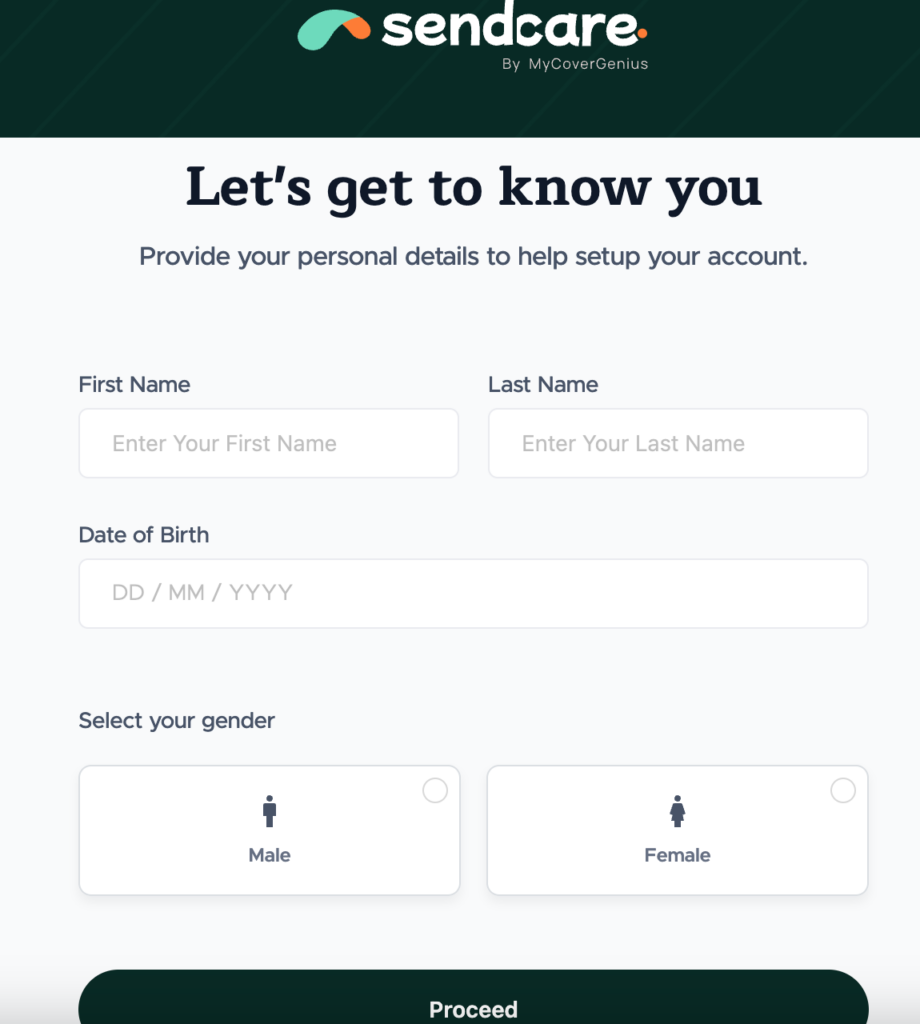
Create a secure password to complete your account setup. Once your account is ready, you’ll have access to your dashboard, where you can manage your parents’ policy and receive updates in real time.
Top tip: Use an email address you check often— policy documents and important notifications will be sent there.
Step 2: Select a health plan for your parent
This is where you choose the right coverage for your elderly parents. Go to ‘Plans’, and select ‘SENIORSPLAN’.
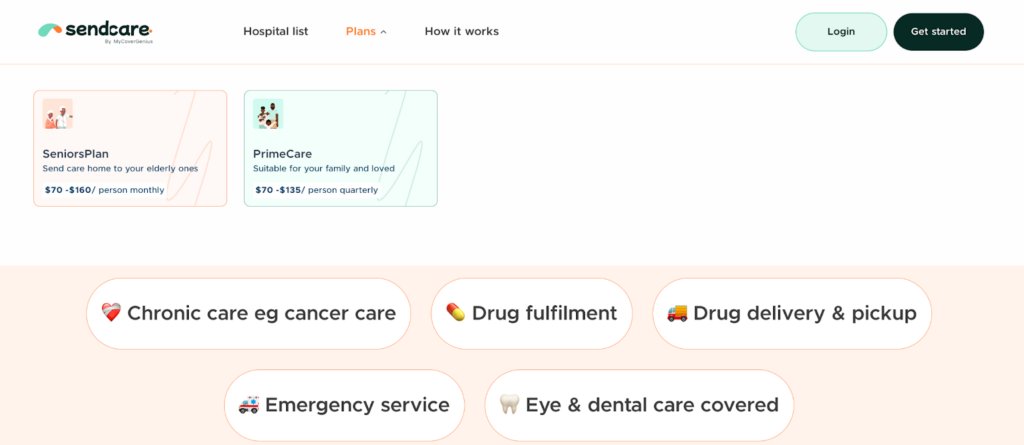
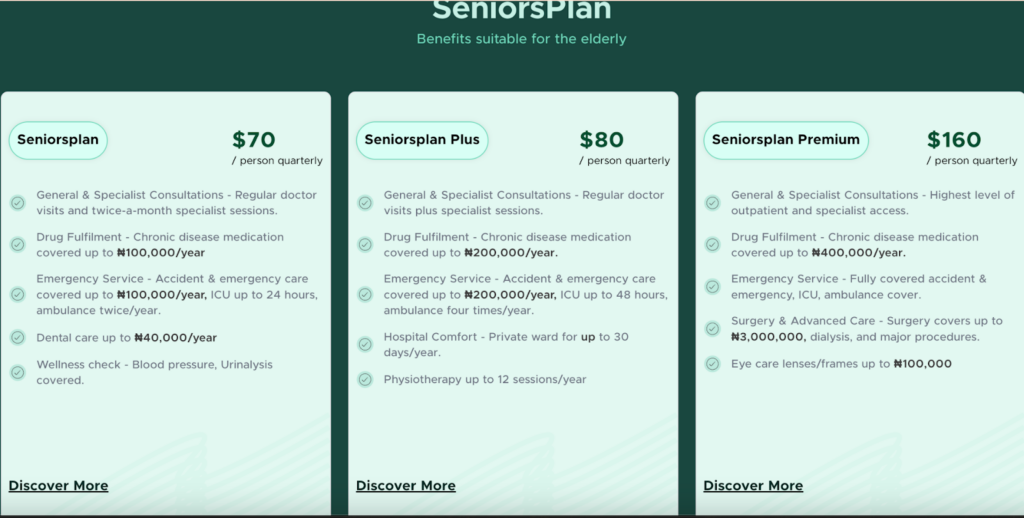
SendCare offers three curated plans specifically designed for elderly health insurance in Nigeria. Here are the plans:
- SeniorsPlan – $70 / person quarterly: SeniorsPlan covers your parents’ everyday healthcare, including doctor visits, lab tests, telemedicine, essential medications, hospital admissions, and accident stabilisation, making it perfect for steady, reliable care.
- SeniorsPlan Plus – $80 / person quarterly: SeniorsPlan Plus adds higher outpatient and pharmacy limits, specialist visits, and extra chronic disease support, ideal for parents who need more frequent monitoring and ongoing care.
- SeniorsPlan Premium – $160 / person quarterly: SeniorsPlan Premium offers full coverage for complex needs, including major surgeries, advanced diagnostics, physiotherapy, dental, eye care, and long-term hospital support for critical conditions.
Step 3: Complete payment safely from abroad
This step removes the biggest headache for you, which is probably trying to navigate Nigerian payment systems from overseas.
SendCare accepts international cards and lets you pay in your own currency (dollars, pounds, or euros). No exchange rate confusion or failed transactions because your UK card won’t work on a Nigerian website.
The payment process is straightforward:
- Review your selected plan and beneficiary details
- Choose your payment frequency
- Enter your international card details on the secure payment page
- Confirm and complete
Your payment is processed instantly. You’ll receive immediate confirmation via email.
Step 4: Confirmation and policy activation
Within minutes of payment, you’ll receive a digital confirmation.
Check your email for:
- Coverage details and hospital list
- Digital HMO ID for your parent
Your parents’ plan activates 24 hours after registration. That’s how quickly they can start accessing care.
What to do next: Share the policy details and digital ID card with your parents or their caregiver. They should save the digital ID on their phone or keep a copy handy, as it will be required at the hospital to receive care.
Step 5: Your parents start using the plan
Once enrollment is complete, your parents can begin using their SendCare plan immediately. They’ll have access to doctors, hospitals, telemedicine services, and prescribed medications for routine care, chronic condition management, emergencies, etc.
Here’s a quick overview of what’s covered and how they can use their plan.
What’s covered in their plans
- Emergency & accident care: SendCare ensures your parents get immediate stabilisation and resuscitative support in case of accidents or sudden illness.
- Chronic condition management: With SendCare, ongoing support is included for conditions like diabetes, hypertension, and heart disease. Chronic medications and regular monitoring are covered.
- Hospital admissions & ward care: Our seniors’plan provides semi-private or private ward access, skilled medical services, and full inpatient coverage depending on the plan.
- Outpatient services: Routine consultations, specialist visits, lab tests, diagnostics, and imaging are included under all SendCare plans, ensuring your parents have continuous care.
- Pharmacy & medications: Essential medications and chronic disease prescriptions are included, with limits depending on the plan. This makes elderly health insurance in Nigeria easier and worry-free.
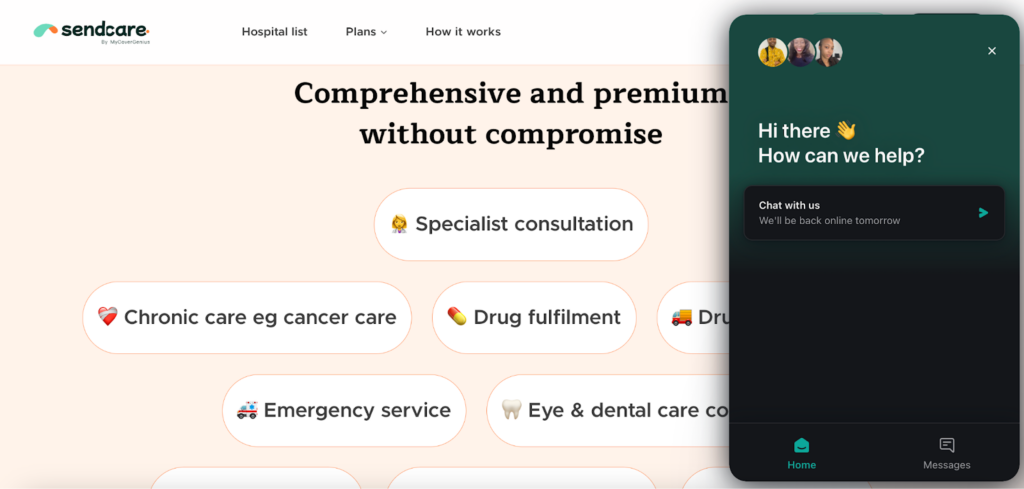
- Specialised care: Physiotherapy, dental, eye care, and telemedicine services are part of SendCare, providing comprehensive coverage for complex health needs.
How your parents can access care at Hospitals
- Start with the “Visit Hospital” feature: Always click this button on your dashboard. It helps track your parents’ progress and prepares the hospital for their arrival, especially during emergencies.
- Present HMO I.D.: Your parents have to present their HMO ID at the hospital. It lists the provider (e.g., Bastion) and plan type.
- Contact Support if Needed: If your parents encounter any issues at the hospital, they can contact our support team via WhatsApp or phone call with this number – 09070008899.
Step 6: Customer support and ongoing management
One of our core promises is to give you reliable, ongoing support so managing your parents’ health insurance stays simple and stress-free, even from overseas.
From your dashboard, you can easily:
- View claims history and track hospital visits
- Add or remove beneficiaries as your family needs change
- Update contact and payment details
- Download policy documents
- Manage renewals
If you need assistance, SendCare offers dedicated customer support and account managers you can reach via WhatsApp, email, or phone. They understand the challenges of coordinating care from abroad and respond promptly when you need help.
Why you need health insurance for your elderly parents in Nigeria
Healthcare costs in Nigeria can be overwhelming. A single hospital admission can run into hundreds of thousands of naira. For elderly parents with chronic conditions that require regular medication and monitoring, these costs add up quickly.
As parents age, especially between 55 and 80+, their healthcare needs increase. Chronic conditions become more common, hospital visits become more frequent, and recovery times lengthen. Traditional insurance plans often exclude seniors or charge premiums that are prohibitively expensive. SendCare removes these barriers, offering comprehensive coverage regardless of age or pre-existing conditions.
For example, your parents can schedule routine weekly, monthly, health preventative health checks instead of waiting for you to send money from abroad. All they have to do is go directly to the nearest network hospital, present their HMO ID, receive treatment, and get prescribed medication where needed, all covered by the plan you purchased. You’re notified of the visit through your dashboard, and they never pay out of pocket.
Without proper health insurance for seniors, your parents might delay seeing a doctor due to cost, turning manageable conditions into emergencies. With SendCare, your parents get preventive care, regular check-ups, and timely treatment while you enjoy peace of mind, knowing they are protected no matter where you are.
Get your parents protected today
Now you know exactly how SendCare works. Getting health insurance for your parents in Nigeria has never been easier, and you can do it all from abroad in less than 10 minutes.
Set up a plan for them today and take the first step towards protecting the people who’ve always protected you.
SendCare by MyCoverGenius is healthcare without borders. Protection without limits.
Common questions/FAQs about SendCare by MyCoverGenius
Can I buy insurance for my parents in Nigeria if I’m abroad?
Absolutely. That’s exactly what Sendcare is designed for. You handle everything online from wherever you are: London, Toronto, Dubai, New York, anywhere. Your parents do not need to visit any office or fill out paperwork.
How long does it take for the plan to start?
24 hours after activation. Once your payment and registration are confirmed, your parents can start using their coverage the very next day.
Are pre-existing conditions covered?
Yes, from day one. Stroke, dementia, heart disease, glaucoma, liver disease, diabetes, high blood pressure, etc. Whatever condition your parents are managing, they’re covered immediately. No waiting periods for pre-existing conditions.
How do parents access hospitals?
Your parents simply need to visit any hospital in the Sendcare network and present their policy number or digital insurance card. The hospital confirms coverage and provides treatment. You’ll receive a full list of network hospitals when your policy activates.
Can I update the plan later?
Yes. You can upgrade to a more comprehensive plan at renewal time. If your parents’ health needs change, you can adjust coverage accordingly. Contact customer support if you need to make changes mid-policy.
Leave a Reply